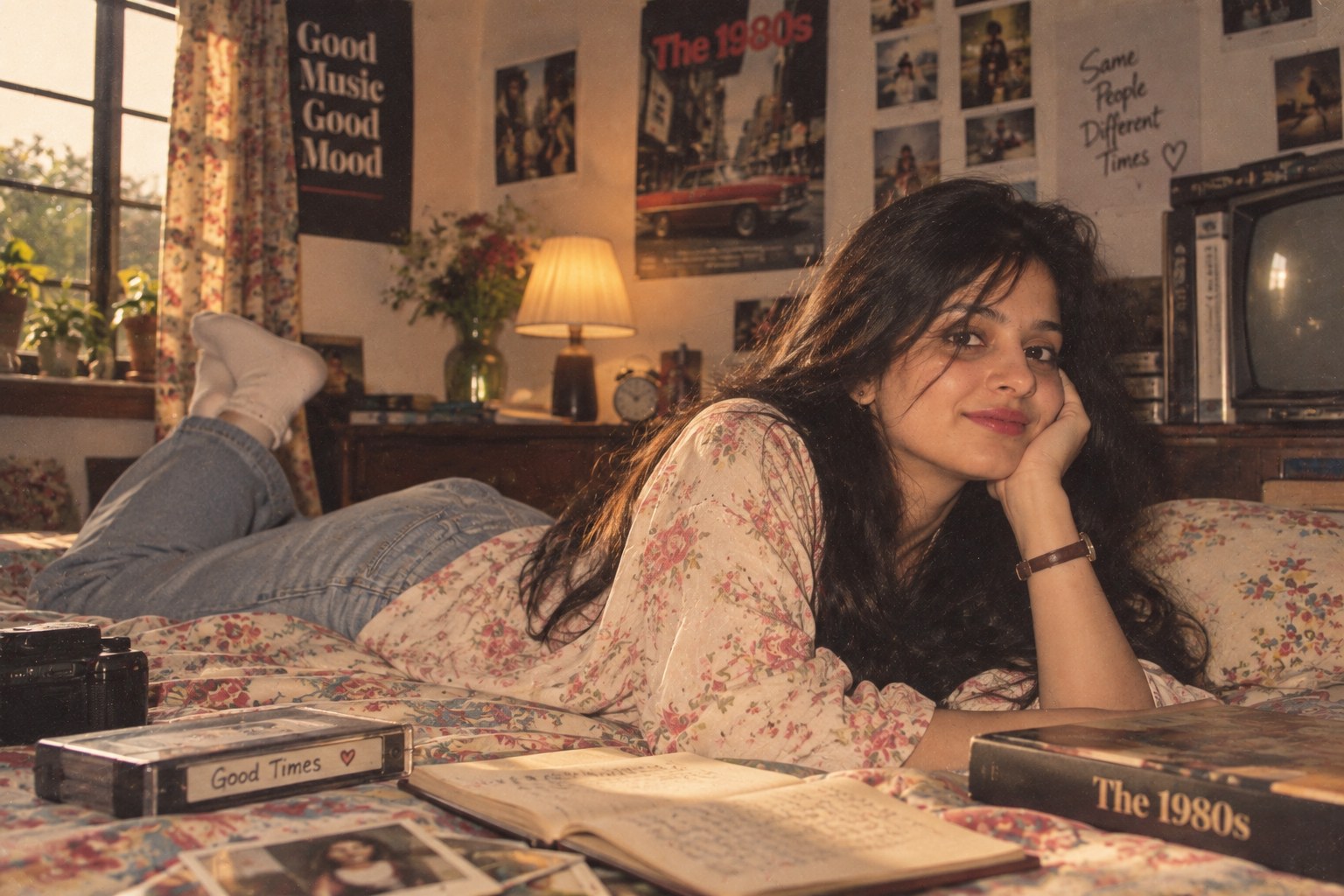
There is a new kind of nostalgia filling Instagram feeds and social posts: people are taking ordinary modern photos and turning them into believable pictures from the 1980s. Instead of applying a simple sepia filter, users are asking image-capable AI tools to rebuild the whole scene — the clothes, hair, lighting, room, camera feel and even the little imperfections that make an old photograph feel real.
The 1980s AI photo trend has quickly moved from a niche experiment into a wider social media format. Recent coverage from technology and trending-news outlets shows people using ChatGPT and similar image tools for retro portraits, family-album recreations, wedding photos, college pictures and regional cinema-inspired looks. Interest in the phrase 1980s AI photo prompt ChatGPT has also surged in India, according to recent trend reporting. The Creators Index trend report
What is the 1980s AI photo trend?
At its simplest, the trend is an AI image transformation. You upload a photo, describe the decade you want, and ask the model to reinterpret the image with period-appropriate visual details. A good prompt does more than say “make this photo look old.” It tells the model what kind of photograph it should feel like.
That difference matters. A generic vintage filter mainly changes colour. A well-written ChatGPT 1980s photo prompt can change the outfit, hairstyle, background, lighting, framing and camera texture while keeping the person recognizable. The goal is not to make the picture dirty or heavily faded. It is to make it look as though someone really took the photograph decades ago.
Recent examples covered online include old-school family albums, Kerala-inspired portraits, college photographs and Indian cinema-inspired looks. The regional variations are especially interesting because they give the trend more character than a generic “retro” preset. Indian Express coverage of the 1980s photo trend
Why are people searching for 80s AI photo prompts?
Part of the appeal is simple nostalgia. Another part is that the results are easy to share. A person can post a modern selfie beside an imagined version of themselves from another decade, and the contrast is instantly understandable.
There is also a practical reason the trend is spreading: modern image models can follow long, specific instructions. You can tell the system to keep your face recognizable, change your hairstyle, add a period-appropriate shirt or dress, use a bedroom or studio setting, and include subtle 35mm film grain. That gives people more control than the old one-tap photo filters used on phones.
The most useful way to think about an AI retro photo prompt is as a small creative brief. Instead of asking for “an old picture,” describe the person, the setting, the wardrobe, the lighting, the camera feel and the mood.
How to create an 1980s-style photo with ChatGPT
Start with a clear image where the face is easy to see. A simple portrait works well, but a casual sitting or family photograph can also be fun. Then upload it to ChatGPT and explain the result you want. Tell the model that you want a realistic period photograph, not a modern image with a vintage overlay.
- Choose a clear source photo with the subject visible.
- Say that you want a realistic 1980s-inspired photograph.
- Specify the clothes, hairstyle, location and mood.
- Add camera details such as 35mm film grain, soft flash or slightly faded print colour.
- Tell the model to preserve the person’s recognizable facial features.
- Check the first result and refine only the parts that look too modern.
Best 1980s AI photo prompt for ChatGPT
Copy and paste this prompt after uploading your photo:
Transform the uploaded photo into a realistic 1980s portrait. Keep the person's facial identity, face shape, skin tone and natural features recognizable. Give the person authentic 1980s clothing and a period-appropriate hairstyle. Use warm indoor lighting, a simple retro room, slightly faded natural colours, subtle 35mm film grain, gentle analog softness and realistic old-camera texture. Keep the composition believable, with natural skin texture and small imperfections. Make it feel like a real photograph taken in the 1980s rather than a modern image with a vintage filter. Avoid exaggerated effects, plastic skin and overly strong sepia tones.
80s retro photo prompt for a bedroom or family-album look
For a more personal result, use a scene with objects that help sell the decade. A radio or cassette player, printed photographs, books, patterned bedding, a simple lamp and older furniture can tell the story without making the image look like a movie set.
Turn this photo into a natural late-1980s family-album photograph. Keep the people recognizable and preserve their real facial features. Place them in a cozy bedroom or living room with period-appropriate furniture, a cassette player, printed photos, books and a warm table lamp. Use authentic 1980s clothing and hairstyles, soft indoor flash, slightly faded print colours, fine 35mm grain and mild analog softness. Keep the scene realistic and understated, like a genuine family photo stored in an old album.
More long-tail prompt ideas you can try
You do not need to use the exact same wording every time. Changing the setting can produce a completely different result while keeping the core retro look.
1980s college photo
Recreate this image as a realistic 1980s college photograph. Preserve the person's identity and natural face. Add period-correct college clothing, hairstyle and accessories, a simple campus background, warm daylight, slightly faded colours and subtle 35mm film grain. Make it look like an authentic photo from the late 1980s, not a modern picture with a filter.
80s wedding album
Transform this photograph into an authentic 1980s wedding-album image. Keep the people recognizable. Use period-appropriate Indian wedding clothing, classic hairstyles, soft camera flash, slightly warm colours, natural film grain and the look of a printed family album. Avoid modern photography equipment, modern backgrounds and excessive cinematic effects.
Kerala-inspired 80s portrait
Give this photo a realistic 1980s Kerala-inspired portrait treatment. Preserve the person's face and identity. Use period clothing, traditional Kerala details, a simple local interior or courtyard, soft daylight, analog 35mm grain and naturally faded print colours. Keep the result tasteful, documentary-like and believable rather than theatrical.
How to make an AI retro photo look more realistic
The first mistake people make is asking for too many effects. Heavy scratches, extreme yellowing, strong blur and dramatic light leaks can make the picture look like a template. Real old photographs vary, so a better result usually comes from small imperfections.
Ask for subtle film grain instead of “lots of grain.” Use soft analog colour instead of “extreme vintage colours.” Mention a believable light source rather than asking for “cinematic lighting.” And remember that the decade should be visible through clothing, objects and composition as much as through colour.
Another useful trick is to choose one visual idea and build around it. For example, a “bedroom family album” has a different feel from an “80s studio portrait.” A “college photograph” should have a casual composition. A “wedding album” should feel posed. Giving the image a reason to exist makes the prompt more coherent.
Why your face sometimes changes in an AI 80s photo
AI image generation is not a perfect photo restoration process. When a model is asked to change clothing, pose, lighting and background at the same time, it can also change facial details. That is why identity preservation needs to be stated clearly.
Useful wording includes “keep the person's facial identity recognizable,” “preserve the face shape and natural features,” and “do not replace the person's identity.” If a first attempt changes the face too much, ask for a second pass that keeps the composition but restores the original facial proportions.
Can you use these 1980s prompts for Instagram?
Yes. The format is especially suited to Instagram posts, Stories and short Reels because the transformation is easy to understand visually. A simple post can show the original first, the retro result second and the prompt in the caption or a follow-up slide.
For better engagement, choose a specific angle rather than posting a generic “80s filter” image. For example, you can frame it as “how I might have looked in an old family album,” “1980s college photo,” or “retro bedroom portrait.” Those phrases describe the idea clearly and give the audience something to compare.
One privacy point before you upload a photo
There is a practical issue behind the fun. An AI photo service needs to process an image you upload, and different providers can have different retention, privacy and training policies. Recent reporting has highlighted concerns around personal images and metadata when people upload selfies to AI services. Financial Express privacy coverage of the 80s AI photo trend
That does not mean you should avoid the trend altogether. It simply means you should think before uploading highly private photos, identity documents, children's photos or pictures that contain sensitive information. When a photo is just for a social post, use a copy rather than your only original image, and check the service's current privacy controls.
What the trend tells us about AI image editing
The interesting part of the 1980s photo trend is not really the decade itself. It shows how image generation has shifted from adding a filter to rebuilding visual context. People are not only changing colours; they are asking a model to recreate the social details of another time.
That makes prompting more important. The best results often come from describing why the image should look a certain way. An old family album has soft flash, casual poses and imperfect framing. A studio portrait has controlled light and a simple backdrop. A college photograph has a relaxed setting. When the prompt matches the type of photograph, the output usually feels more convincing.
Small prompt changes can make a big difference
Once you have one version you like, change one detail at a time instead of rewriting the whole prompt. Try a different room, a softer flash, a patterned shirt, a slightly wider camera angle or a more casual expression. This makes it easier to see which instruction actually improves the picture. It also helps avoid the common problem where an AI model keeps changing the face, pose and background together. For a more believable result, describe a simple moment rather than a perfect fashion shoot: sitting beside a cassette player, standing near a window, looking through an old photo album or smiling during a family gathering. These small details give the image a natural story and make the retro setting feel lived in rather than staged.
Final takeaway
The 1980s AI photo trend is easy to try and flexible enough to make your own. Start with a clear photo, choose one believable 80s setting, describe the clothes and hairstyle, then add restrained film characteristics. A specific prompt will usually work better than a long list of generic “vintage” effects.
For a quick starting point, use the main prompt above, then change the scene to a family album, college campus, wedding, studio portrait or Kerala-inspired setting. The fun comes from seeing how the same person can look like they belong to a completely different photo era.
Sources & further reading: The Creators Index, The Indian Express, and Financial Express.